During the initial wave of artificial intelligence popularity, it was more often mentioned as a problem than a solution. Between 2020 and 2023, the primary focus of information was on risks, including deepfakes, automated phishing, large-scale leaks resulting from algorithmic errors, and the generation of malicious code. Companies feared that algorithms would give hackers superhuman capabilities: a good fake voice, a realistic letter, invisible phishing, and that would be it; the defenses would be broken.

According to Statista, in 2024-2025, more than 60% of large companies will have already implemented AI tools to protect networks and accounts. The result was impressive: incident detection time was reduced by an average of 27%, and losses by 30-35%. The reason is simple: algorithms react faster, see more, and don’t get tired. What appears to be “normal noise” to a human is a threat signal to a model.
AI was once associated with chaos and risks. Today, it is a tool that gives businesses a chance to stop an attack before the attacker has time to press the next key. Find out how it works in practice in this article.
Table of Contents
Why traditional security no longer works
Based on NIST, 20% of organizations’ confidence in their ransomware preparedness dropped after the attack. Imagine: your company processes millions of transactions every day. Each one is a potential entry point for an attack. A five-person security team stares at screens with logs and hopes to spot something suspicious. Realistic? No.
It’s physically impossible for a human to process that amount of data. Even if you have the best specialists, they’ll miss 99% of incidents simply because there are too many of them. And hackers only need to get through once to go unnoticed.
Classic security systems work on the principle of signatures. They know what known viruses look like and block them. The problem is that new threats appear every minute. By the time the signature enters the database, the virus has already changed.
Even worse, modern attacks are not like viruses. These are APTs (Advanced Persistent Threats) – prolonged, targeted attacks that mimic legitimate activity. A hacker can sit in the system for months, collecting data, and no traditional tool will notice them.
How machine learning reveals what is hidden

Traditional security systems operate on a “blacklist” principle: they only look for threats that are already known and have a signature. Machine learning works differently – it builds a statistical model of “normal” behavior in the environment. This involves hundreds of indicators simultaneously: the rate of database queries, the nature of file operations, the sequence of commands in the system, the types of API requests, and the frequency of access to internal services. When the model sees a deviation, even one that does not resemble the signs of any known attack, it is interpreted as an anomaly.
Microsoft Defender for Cloud detected a large-scale credential theft attempt in 2024 by noticing that service accounts, which typically made 3-5 API calls per minute, suddenly began generating 150+ calls. No rule would catch this, but ML did.
In corporate networks, this makes it possible to catch attacks at an early stage. For example, a user who always works with CRM during business hours suddenly executes an export command for 10,000 records at 3 a.m. For classic access control, this is a normal operation: the user has the rights. For ML, it is a behavior change that could mean credential theft, malicious automation, or an internal threat.
Such models work on large arrays of telemetry data and are capable of detecting “weak signals” – subtle, barely noticeable patterns that precede a real attack. For example, complex attacks such as APTs usually make a series of test requests before they begin, which do not resemble typical user errors. A person will not see this among 50 million events in the logs. The model will.
Phishing detection
Modern phishing is not primitive emails with mistakes, but targeted emails that look like internal corporate communications. Often, entire hacker agencies work on them, modeling the style of specific employees, the timing of their messages, and the structure of their sentences. In such conditions, a person is no longer a reliable filter. Google Gmail AI filters block more than 99.9% of phishing attempts, analyzing sentence structure, metadata, and known malicious URL patterns. In 2024, Google reported blocking 100+ million phishing emails daily using AI.

NLP models analyze phishing emails on multiple levels:
– lexical style (manipulative constructions, unnatural urgency);
– morphological patterns (abnormal repetition of identical phrases);
– SMTP metadata (forwarding chain, origin server, fake DKIM/SPF);
– HTML structure (scripts that are not used in legitimate mailings).
AI can also compare the style of the email with the style of a real person in the company. If the CFO always writes in short sentences, and the new email is a long text with atypical stylistics, the system will mark it as a possible business email compromise.
Another level is the analysis of the recipient’s behavior: models see whether a person clicks on a link, how quickly, from which OS, and in which time zone. An attack where an attacker tries to “force” the user to act becomes obvious to the algorithm.
Real-time network traffic analysis
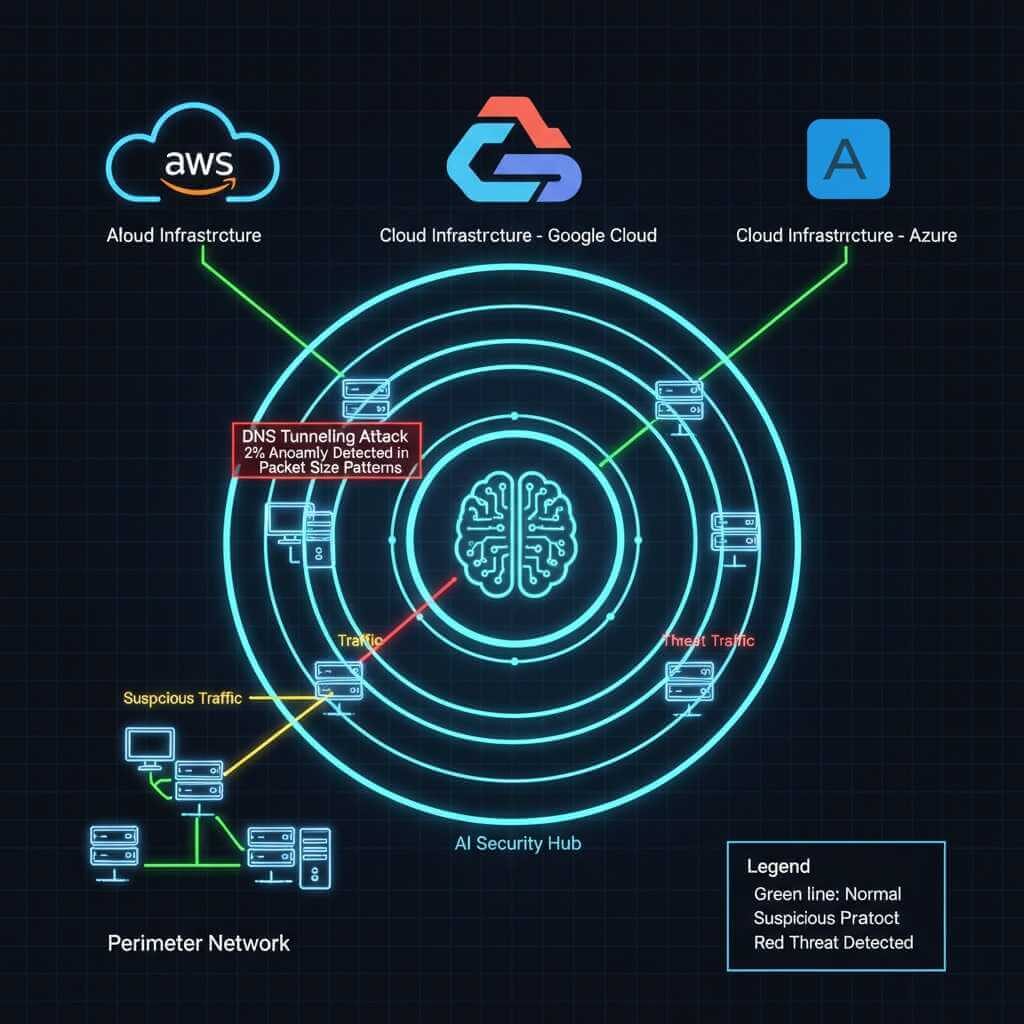
Corporate networks generate tens of gigabytes of traffic every second. ML systems break traffic down into individual packets and analyze them by flow, adjacency, protocol type, data direction, and volume. This enables them to detect attacks that are disguised as normal traffic, such as slow-rate DDoS or DNS tunneling. Darktrace, one of the world’s biggest AI cybersecurity companies, detected a stealthy DNS-tunneling attack in a European healthcare network by noticing just a 2% anomaly in DNS packet size patterns.
When a user’s computer, which only works with an accounting system, suddenly starts making requests to external IP addresses located in regions that are atypical for the business, the ML system immediately raises the risk level. In addition, models can detect lateral movement-the movement of an attacker within the network-based on unusual transitions between network segments. This is one of the most subtle phases of an attack, and traditional systems usually do not detect it.
Automatic response to incidents – without human intervention
Modern SOCs (security operations centers) operate under conditions of overload: an average company generates between 10,000 and 100,000 alerts per day. Even if only 1% of them are critical, the team physically cannot respond in time.
Autonomous response systems eliminate this bottleneck. They don’t just signal – they take action: isolating nodes, blocking ports, deactivating tokens, restricting network routes, rolling back configurations, and initiating recovery from backups. This is possible thanks to playbooks – sets of ready-made scenarios that the system can run without human intervention.
Honeypots are created automatically: the system sees that a hacker is scanning ports and, in a few seconds, deploys a fake server with vulnerable services to enable observation mode. This not only stops the attack but also collects data about the attacker’s tools.
Predicting attacks – seeing the future
The most interesting thing is when AI doesn’t just respond to threats, but predicts them. It sounds like science fiction, but it’s reality.
Systems analyze threat intelligence – information about new vulnerabilities, hacker group activity, and trends in cybercrime. They see that a certain group is starting to scan a certain type of server more actively – and warn that your infrastructure may be next.
Or take insider threats – threats from within. An employee who is about to quit and take data with them. AI notices a change in behavior weeks before the incident. Suddenly, the person starts logging into the system at unusual times. They copy files they haven’t accessed before. They look for information about competitors. Each action is normal on its own, but the pattern is suspicious.
Predictive analytics allows you to assess the likelihood of a successful attack on a specific system. AI analyzes your infrastructure, finds weak spots, and says, “This is where you are most likely to be hacked; you need to strengthen your defenses.” This is no longer reactive security – it is proactive.
Fighting ransomware
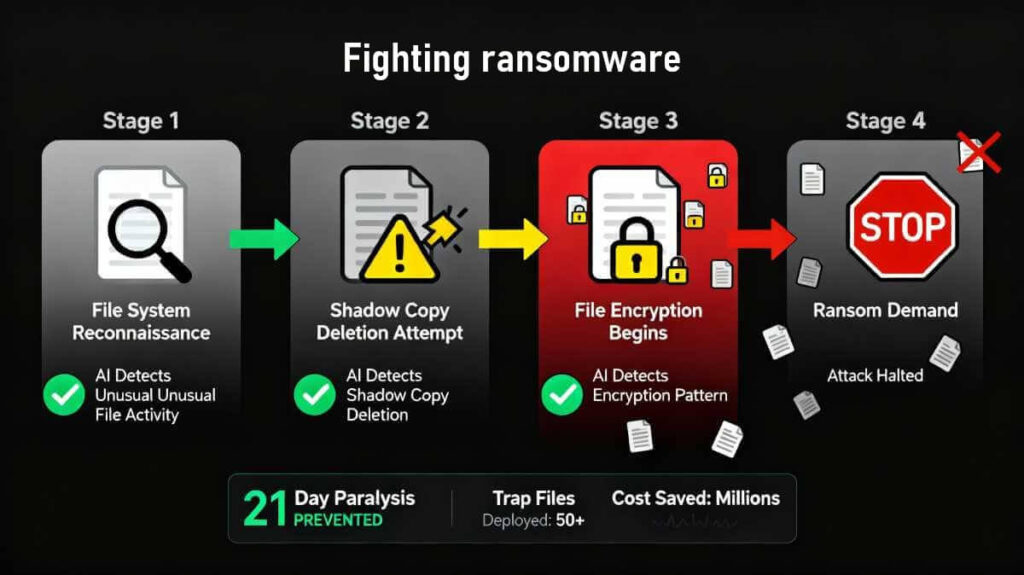
According to Gartner research, ransomware is every business’s worst nightmare. Suddenly, all your files are encrypted, and hackers are demanding millions. Companies are at a standstill. Production has stopped. Customers are waiting. Every hour is money lost.
Traditional antivirus software only detects ransomware once it has already started encrypting files. But by then it’s too late. AI detects ransomware at the preparation stage.
The algorithm sees that the process is starting to read files too actively. Or that the file structure is changing unusually. Or that the program is trying to delete shadow copies – backup copies created by Windows. All of these are signs of ransomware before encryption begins.
Some systems create trap files. They are located in different parts of the file system and look like ordinary documents. As soon as the ransomware starts to encrypt them, an alarm is triggered. The process is undone, the machine is isolated, and the attack is stopped. A few trap files are lost instead of the entire infrastructure.
Some AI systems can even decrypt files after an attack if they have recorded how the ransomware worked. This is not always possible, but sometimes it saves the situation without paying the ransom.
Protection against zero-day vulnerabilities
Zero-day vulnerabilities are vulnerabilities that no one knows about yet. There is no patch. There is no signature. Traditional security systems are blind. And hackers actively exploit them. Google Chrome’s Site Isolation AI module caught multiple exploit chains in 2023-2024 by detecting unusual memory access patterns, even before patches were released.
AI catches zero-day vulnerabilities through behavioral analysis. It doesn’t look for known vulnerabilities – it looks for unusual program behavior. If a browser suddenly starts executing code in memory, even though it didn’t do so before, that’s suspicious. If an application tries to obtain administrator rights unusually, we block it.
There is a technique called sandboxing – running suspicious files in a virtual environment. AI automatically sends unfamiliar files to the sandbox, watches what they do, and decides whether it is safe to run them in the real system.
Fuzzing is the automatic testing of programs for vulnerabilities. AI generates thousands of random inputs and sees if the program can be hacked. This allows zero-day vulnerabilities to be found before hackers find them.
Access and identity management
Passwords are the weakest link in security. People use simple passwords, repeat them on different sites, and write them down on sticky notes. AI makes access management smarter.
Behavioral biometrics analyzes user behavior. How fast do you type? How do you move the mouse? What pattern do you use when tapping on your phone screen? This is unique to each person. Even if a hacker steals your password, they won’t be able to imitate your mannerisms.

Continuous authentication – constant verification that you are still you. Traditionally, you enter your password at the beginning of the workday, and that’s it; the system considers you legitimate until the end of the day. AI checks constantly. If your work style suddenly changes, someone else may be at the computer.
Adaptive access control is the dynamic management of access rights. Working from home? AI gives you limited access. On a business trip to another country? Additional verification. Logging in at 3 a.m., even though you usually work from 9 a.m. to 6 p.m.? You need two-factor authentication.
SOAR – routine automation for security teams
Security Orchestration, Automation, and Response is when AI takes over the routine work that takes up 80% of your security team’s time.
Imagine a typical incident. An alert goes off. An analyst looks at the log. Checks the IP in threat databases. See if this user has been compromised before. Checks what other systems have been affected. Look for similar incidents in history. That’s hours of work for one alert. There are hundreds of alerts a day.
SOAR automates all of this. The system collects information from all sources, correlates data, determines the priority of the threat, and even performs basic response actions. The analyst receives a ready-made report: what happened, how critical it is, what has already been done automatically, and what requires manual intervention.
Plus, SOAR integrates with all your security systems. Firewalls, IDS, SIEM, threat intelligence, backup systems – everything works as a single unit. An incident in one system instantly triggers a response in others.
Threat hunting – actively searching for hidden threats
Traditional security is reactive: we wait for an alert and then respond. Threat hunting is proactive. The security team uses AI tools to actively search for threats that may already be in the system.
It’s like the difference between waiting to be robbed and hiring a detective to find the thieves before they rob you.
AI helps in this process by analyzing huge amounts of data and finding anomalies that humans would not notice. For example, a certain process is running with unusual frequency. Or that there are patterns in the logs that are characteristic of a particular hacker group.
Hypothesis-driven hunting is when you build hypotheses about how a hacker could have infiltrated and test them using AI. “What if they exploited this vulnerability?” → AI searches the logs for signs of exploitation → finds or refutes the hypothesis.
Some systems use unsupervised learning to cluster events. They group similar events, and the analyst can quickly see if there is anything suspicious among these groups. Instead of analyzing millions of records, you analyze a dozen clusters.
API and microservice protection
Modern applications are not monolithic programs. They consist of dozens or hundreds of microservices that communicate via APIs. Each API is a potential point of attack.
API attacks are growing exponentially. Hackers look for unprotected endpoints, unauthorized methods, and inject malicious data. Traditional WAFs (Web Application Firewalls) cannot cope because API traffic is too diverse.

AI studies normal API behavior: what parameters are usually transmitted, what volume of data, what frequency of requests. If the API suddenly starts receiving requests with unusual parameters or in an unusual volume, this is a sign of an attack.
ML-based rate limiting – the system does not simply limit the number of requests from a single IP address. It analyzes whether these requests are legitimate or whether they are a scripted attack. A legitimate user can make many requests – and that is normal. A hacker’s script makes similar requests – and these are blocked.
API inventory – AI automatically finds all APIs in the infrastructure, including those you have forgotten or did not know about. Shadow APIs are APIs that developers have created and not documented. They remain unprotected because the security team does not know about them. AI finds them and reports them.
Cloud infrastructure protection
Migrating to the cloud creates new security challenges. Data is no longer in your office under your control. It is distributed between AWS, Azure, and Google Cloud. Configurations change daily. Containers start and stop automatically. AWS GuardDuty + AI detected unauthorized access attempts in a retail company by comparing login patterns with millions of historical anomalies across AWS networks.
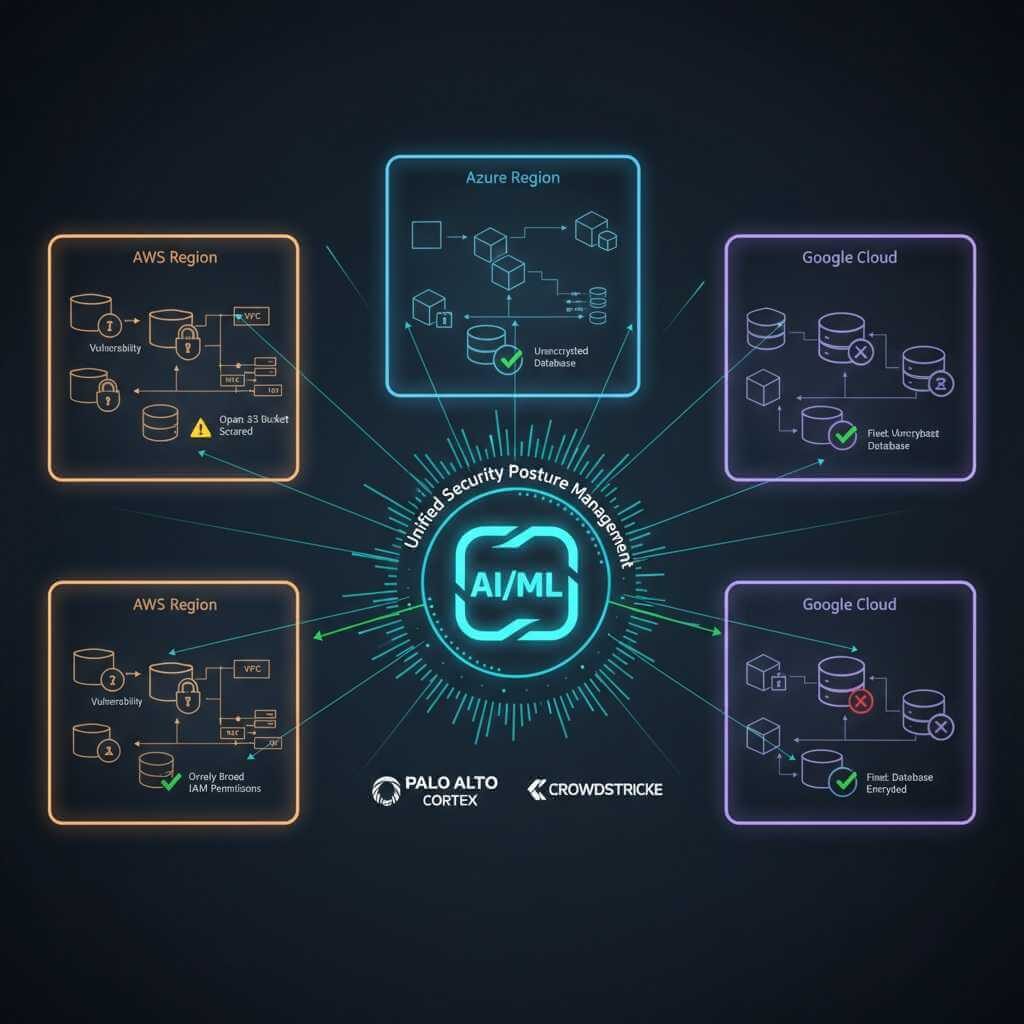
Cloud security posture management – AI constantly scans the cloud environment for incorrect configurations. An open S3 bucket? Overly broad access rights? Unencrypted data? The system finds and warns you before hackers have a chance to take advantage.
Workload protection – protection for virtual machines and containers. AI monitors what is happening inside each container: which processes are running, which connections are established. If a container starts behaving unusually, it may be compromised.
Multi-cloud visibility – when you use multiple cloud providers, AI aggregates security data from all of them and provides a single view. You can see your entire infrastructure in one place, rather than switching between AWS, Azure, and GCP consoles.
Detecting and blocking bots
Bots account for a huge portion of Internet traffic. Some are legitimate (Google search robots). Others are malicious (scrapers, spammers, DDoS botnets).
Detecting bots is difficult because they mimic human behavior. They use real browsers, rotate through proxies, and change User-Agents. Traditional methods such as CAPTCHA are ineffective and annoy users.
AI analyzes behavior at a level that is inaccessible to humans. Cursor movement speed. Time between keystrokes. Scrolling patterns. People move chaotically, bots move too perfectly. Even if a bot tries to imitate chaos, AI will notice that this chaos is too formulaic.
Device fingerprinting – AI creates a unique device fingerprint based on hundreds of parameters: screen size, installed fonts, browser version, Canvas settings. Even if a bot changes its IP and User-Agent, the fingerprint remains.
Some systems use honeypots for bots – fake forms or links that are invisible to humans but that bots will try to use. Once a bot takes the bait, it is identified and blocked.
Automated red teaming – when AI attacks itself
Red teaming is when a team of hired hackers tries to hack into your system to find vulnerabilities. The problem is that it’s expensive and happens once a year at best.
Automated red teaming is an AI that constantly tries to hack into your infrastructure. It simulates various types of attacks: SQL injection, XSS, privilege escalation, and lateral movement. It does this 24/7 and reports every vulnerability it finds.
Adversarial machine learning – when one AI tries to trick another. For example, it generates phishing emails that it tries to slip past an ML-based anti-spam filter. The protection system learns to recognize even the most sophisticated attacks.
Purple teaming is when attack and defense teams work together. AI attacks, AI defends, and both systems learn from each other. This speeds up the evolution of protection many times over.
AI cybersecurity for individual users and small businesses
AI in cybersecurity is no longer an abstraction, but a convenient thing that can be felt in everyday life. IBM’s Cost of Data Breach Report claimed $1.9 million in cost savings from extensive use of AI in security, compared to organizations that didn’t use these solutions. For example, you go to a food delivery website, and an AI plugin in your browser instantly highlights in red that the domain is fake and the page was created just two days ago. Or you receive an email “from the bank”, and your phone’s security system warns you that a fraudulent model generated the text and that the sender is masquerading as a real address. Such algorithms analyze the style of the letter, the time it was sent, and the structure of the links – things that a person may not notice.
For small businesses, AI works like a night guard who never sleeps. Imagine a coffee shop with online orders. The owner is asleep, but AI detects that someone is trying to log into the admin panel from another country and automatically blocks access. Or a small online store, AI notices an abnormal number of requests to the same API and instantly cuts off traffic to prevent a DDoS attack. Another practical example: AI can catch an “internal” problem, for example, an employee accidentally uploading a document with customer data to a public cloud service. Without AI, this would be almost impossible to track.
The most valuable thing is that all this works without the need to understand firewall settings or logs. AI takes on the routine, technical “dirty” work and does it at a level that was previously only available to large corporations with their own security departments. Now everyone can protect themselves: from students with laptops to the coffee shop on the corner.
How much does it cost, and is it worth it?
I understand, you’re thinking, “Sounds cool, but how much does it cost? And does my business need it?”
First, the price. AI cybersecurity solutions range from $50 per month for small businesses to millions per year for corporations. But let’s look at it another way.

The average cost of a data breach in 2025 is $4.88 million. These are direct losses: fines, legal fees, and customer compensation. Plus reputational damage, which cannot be measured in monetary terms.
A ransomware attack paralyzes a business for an average of 21 days. Calculate how much your company loses in 21 days of downtime. Add the ransom ($200,000-$5,000,000 on average). Now, AI protection for $100,000 a year doesn’t seem expensive, does it?
Second, efficiency. A team of five people can handle 50-100 incidents per day. AI handles thousands. Plus, it doesn’t get tired, take vacations, or quit.
Third, compliance. GDPR, PCI DSS, HIPAA – all these standards require a certain level of protection. AI automatically generates reports for auditors, tracks policy compliance, and warns of potential violations.
What are the risks, and how to minimized them
AI in cybersecurity is not a panacea. There are risks you need to be aware of.
False positives – when the system sees a threat where there is none. This annoys the team and creates a “wolf-crying effect”: when a real attack occurs, it may be ignored.
False negatives – when the system misses a real attack. This is worse than false positives because it creates a false sense of security.
Adversarial attacks – when hackers specifically attack the AI itself, trying to trick it. For example, they generate malicious code that looks legitimate to the ML model.
Dependency on data – AI is only as good as the data it was trained on. If the data is incomplete or biased, the system will not work effectively.
How to minimize? First, combine AI with traditional methods. This is defense in depth – multi-level protection. Second, constantly update models with new data. Third, have people who understand how AI works and can intervene when necessary.
What’s next: cyber weapons of the future
We are at the beginning of an arms race between AI defense and AI attacks. What’s next?
Quantum computing will create new challenges. Quantum computers will be able to crack modern encryption in minutes. But defense is also evolving – quantum-resistant cryptography is already being developed.

Generative AI for attacks – GPT-like models will generate personalized phishing campaigns tailored to each victim. But defense will also use generative models to simulate attacks and train.
Decentralized security – when protection is not in one center, but distributed among all network nodes. Blockchain-based intrusion detection systems, where decisions are made by consensus among nodes rather than by a single server.
AI-powered deception – systems that automatically create complex networks of honeypots that change in real time. A hacker penetrates the system but actually ends up in a maze of traps where their every move is monitored.
Many so‑called ‘AI optimizers’ are just malware in disguise; this Windows 11 AI performance and security guide explains how to spot fake boosters and rely on Smart App Control instead.
How to start implementing AI?
Step 1: Assess your current security posture. Conduct an audit to understand your vulnerabilities.
Step 2: Start with one area. You don’t need to implement everything at once. Select the most critical area, such as phishing detection or ransomware protection.
Step 3: Choose a solution that integrates with your current infrastructure. You don’t have to rebuild everything from scratch.
Step 4: Train your team. AI is a tool, and people need to understand how to use it.
Step 5: Monitor and adapt. The first few months will be a learning curve. That’s normal.
There are ready-made SIEM solutions with built-in ML (Splunk, QRadar, ArcSight). There are cloud-native platforms (Palo Alto Cortex, CrowdStrike). There are open-source tools for those who want more control.
AI in Cybersecurity: Adapt or lose?
Cybercrime is evolving faster than ever. Hackers use AI to automate attacks, search for vulnerabilities, and generate malicious code. If your protection still relies solely on traditional methods, you’ve already lost this race.
AI in cybersecurity is not a fad or something that belongs to the distant future. It is a necessity of the present. Companies that fail to adapt become easy targets, and the cost of incidents is growing exponentially.
The good news is that the technology is available. You don’t have to be Google or Microsoft to implement effective AI protection. There are solutions for businesses of all sizes.
The question is not whether you need AI in cybersecurity. The question is whether you can afford not to have it. A single attack can cost millions and destroy a reputation that took years to build. AI protection is not an expense; it is an investment in the survival of your business. According to 95% of specialists, AI-powered cybersecurity solutions significantly improve the speed and efficiency of prevention, detection, response, and recovery.
The future of cybersecurity is already here. And it is determined by who adapts AI faster: you or those who want to hack you.