An article idea can arrive halfway through a run, nowhere near a desk.
That happened to me when I thought of a concept for a new post on TechInDeep. I wanted to save its direction before I forgot: a central question, several supporting points, and a reason someone might find the topic useful.
I used Atomic Chat on my Android phone to get that thought down. My immediate goal was not to finish an article. I needed enough detail to revisit later.
That experience led to a separate question: could an offline note summarization app help organize personal thoughts without sending them to a third-party cloud service?
Compatible Android phones can run downloaded language models locally. That answers the basic technical question, but not every privacy question. Processing location, saved-data encryption, voice transcription, and network activity need separate checks.
This article combines my setup experience and personal priorities with a review of published documentation. No controlled speed, battery, or thermal measurements were recorded, and no independent privacy audit was conducted.

Table of Contents
Why I Wanted Offline Note Summarization on Android
My notes rarely begin as tidy paragraphs. An article concept might start as a question, jump to a technical detail, then end as a list of possible headings.
I do not necessarily want an assistant to write that article for me. I want help arranging the rough material without changing its meaning.
Saving the thought on my phone is the starting point; developing it later is a separate task. For that desktop stage, I covered Windows note-taking options in another guide. Any transfer between devices needs its own privacy check.
Personal notes create another concern. An unfinished thought is not always something I would share, publish, or agree with later. I want room to express uncertainty without automatically submitting every sentence to a remote service.
Offline AI appeals to me because I want to organize personal thoughts on my phone without sending each note to a cloud service.
That does not establish complete privacy. An application might process text locally yet retain readable chat history or transmit diagnostic information. I wanted to assess those boundaries rather than assume that “offline” answered everything.
How an Offline Note Summarization App Works
A local summarizer stores model files on your phone. Its inference engine uses compatible hardware to generate output from your text.
After downloading required files, a supported workflow can operate without a live connection to a remote model.
Original note → local model → generated summary → saved outputGoogle’s on-device inference documentation describes infrastructure for running language models across Android and other platforms.
Installing an application is not the same as installing a model. A small application download may still require a separate, much larger model download.
Voice notes add another stage:
Recording → speech recognition → transcript → summarizationEvery stage needs checking. Local text generation does not establish local speech recognition, and local processing does not establish encrypted storage.
For the technical background, my guide to how smartphone AI chatbots process text explains tokens, inference, smaller models, and the difference between local and cloud processing.
Before Starting: Check Your Phone
Available memory is an early compatibility check, alongside processor capability and software support. A phone may install an app yet struggle to load a larger model.
I started using a smaller text model rather than treating the largest available download as the default choice.
Model weights occupy storage, but inference needs working memory too. Runtime buffers, application overhead, and context storage contribute to RAM use.
A model fitting on disk does not establish that enough RAM remains to run it comfortably.
Android Offline AI Setup Checklist
Published specifications below apply to the application used for this article, not every Android inference engine. Practical actions are labeled separately. This is a setup checklist, not a measured performance comparison.
| Check | Published specification or practical action | Reason |
|---|---|---|
| Android version | Published requirement: Android 7.0 or later. | Checks app compatibility, not model performance. |
| RAM | Published recommendation: 6 GB or above. | Model loading depends on available memory, including memory used elsewhere. |
| Model storage | Published estimate: approximately 1–4 GB per model. | Leave additional space for application data and system operations. |
| Internet access | Needed for installation and required downloads. | Finish setup before testing disconnected operation. |
| First test | Practical action: summarize fresh, non-sensitive text after disconnecting. | Checks the selected workflow without exposing private material. |
Check the published Android requirements against your installed release, as software requirements can change.
Cache Compression Is Not Total Memory Reduction
The developer advertises TurboQuant and claims at least a sixfold reduction in KV-cache memory. A KV cache stores intermediate attention data during generation and can grow as a conversation gets longer.
That claim concerns a specific memory component, not a sixfold reduction in total application RAM. This article did not verify the claimed reduction on Android or establish which mobile models and execution paths support it.
I would not use that figure alone to decide whether a larger model fits my phone.
How I Tested Offline Note Summarization on Android
My setup focused on a narrow question: could a downloaded local model process fresh text after I disconnected the phone?
This was a functional check, not a test of every feature or privacy claim.
Step 1: Install the Android App
I opened the Atomic Chat Android page and followed its Google Play download link. Before installing, I checked that the listing matched the intended application.
I launched the app using Wi-Fi. Its published documentation says local use does not require an account.
Installation supplied the interface and supporting software. Downloading a compatible model was a separate step.
Step 2: Download a Small Text Model
I opened the model selection screen, chose a smaller available text model, and waited until its download finished.
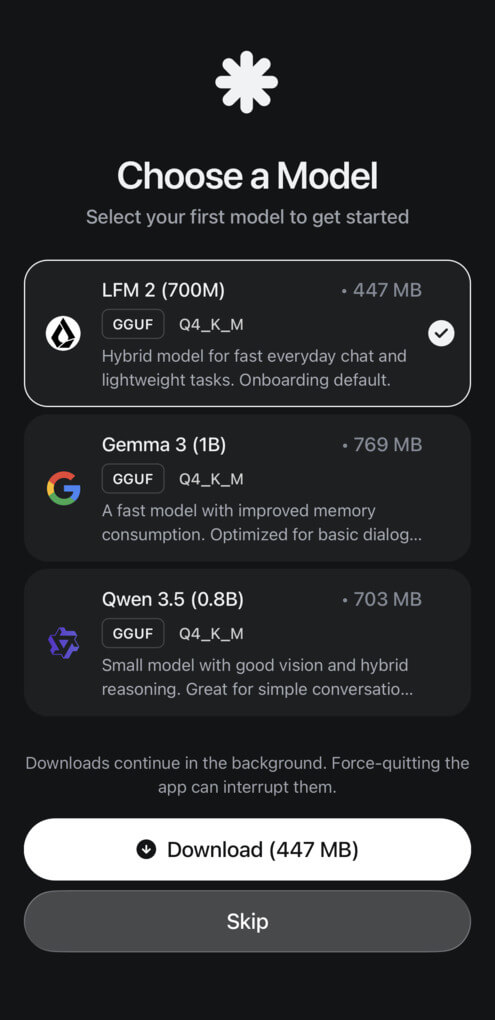
Model catalogues and file sizes can change across releases. I would use the choices displayed inside the installed Android version rather than rely on a fixed model name from an older tutorial.
A smaller compatible model is a sensible starting point for a memory-constrained phone. That choice does not guarantee quality; the output still needs checking.
Step 3: Prepare Fictional Notes
I used fictional project notes rather than private meeting details:
Project notes: The team will update the landing page on Tuesday. Maya will draft the new headline. Alex will check the mobile layout by Thursday. The product screenshots need replacement before Friday. The launch date is not confirmed. The next review is scheduled for Monday.
This passage contains tasks, named owners, dates, and an unresolved item. Those details provide a practical accuracy checklist.
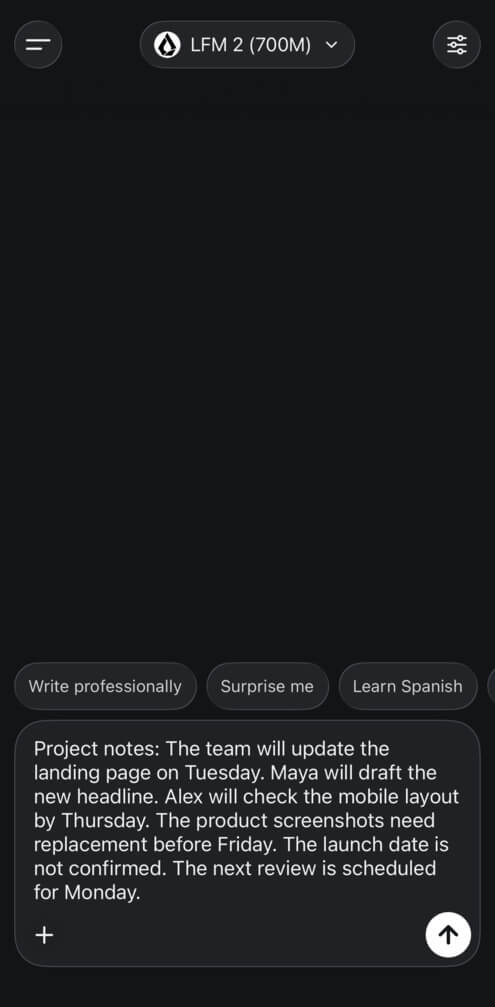
Maya has no stated deadline. Tuesday belongs to the landing-page update, not automatically to her headline task. Monday’s review is separate from the unconfirmed launch date.
Step 4: Disconnect and Request a Summary
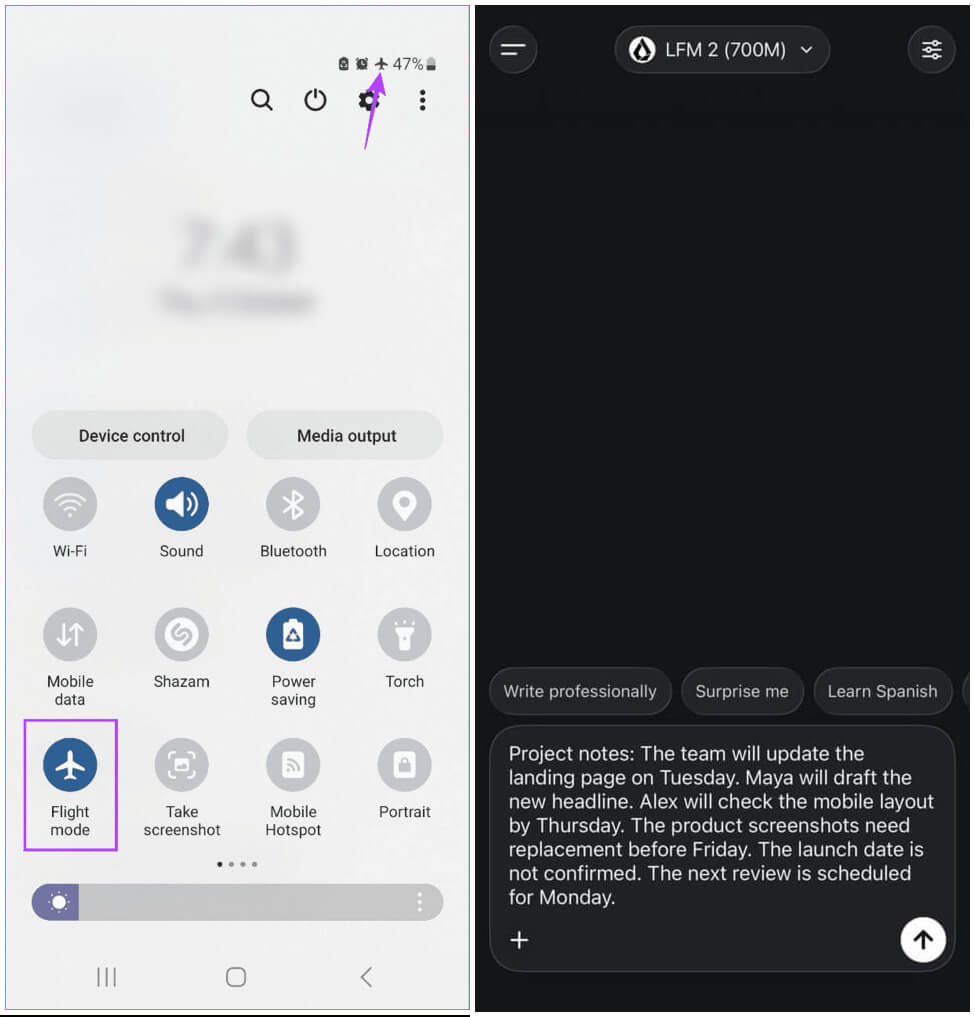
After downloading the model, I enabled airplane mode and checked that Wi-Fi and mobile data were off. Android can permit Wi-Fi to operate separately, so I did not rely on the airplane-mode icon alone.
I selected the downloaded local model, opened a fresh conversation, and pasted the notes using this prompt:
Summarize the notes below using no more than five bullet points. Preserve every named owner, stated deadline, and scheduled review. Add a separate “Open question” line for anything not confirmed. Do not invent missing details or assign deadlines unless explicitly stated. Notes: [paste the notes here]
My checklist covered Tuesday’s update, Maya’s task, Alex’s Thursday deadline, screenshot replacement before Friday, Monday’s review, and the unconfirmed launch date.
This describes the expected facts, not a quoted model response. Any missing date or invented launch day would count as an error.
Step 5: Repeat Using Fresh Input
I repeated the test after closing and reopening the app in airplane mode, keeping the downloaded local model selected.
A fresh prompt matters. A previously displayed answer is not evidence of new processing.
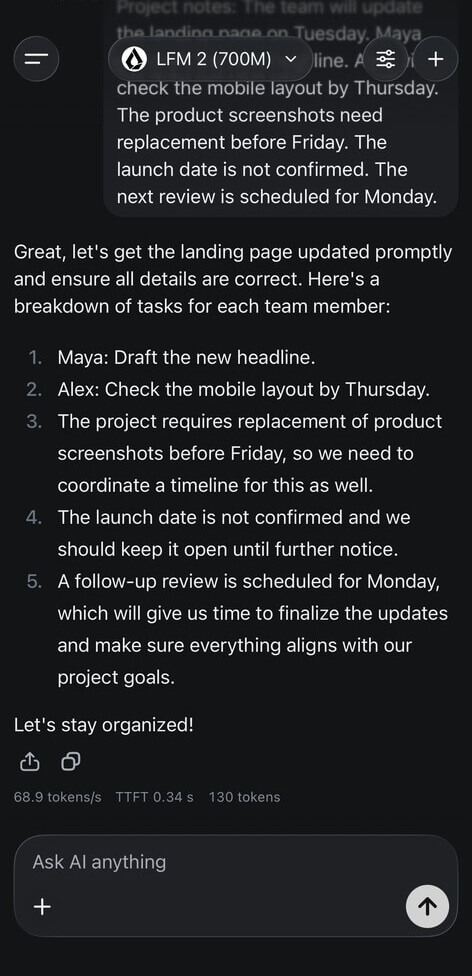
For a repeatable test, change several names, dates, and tasks before requesting another summary.
Successful fresh output under disconnected conditions supports a limited finding: the selected text workflow functions without live remote inference.
That does not establish encrypted storage or rule out data transmission after reconnection.
Offline Note Summarization: Suitable Tasks and Limits
Short summaries, rewriting, bullet-point extraction, and simple explanations are sensible starting tasks for a local model.
Google’s mobile deployment documentation lists document summarization among on-device text tasks. Accuracy still depends on the model, language, source text, and instructions.
Complexity and Input Length Are Separate Limits
A lengthy transcript can exceed configured context limits or available memory. A short but difficult reasoning task can produce errors even when the full prompt fits.
Complex coding, multi-step analysis, and technical research need testing beyond a brief note-summary trial.
Current facts present another issue. A disconnected model cannot independently verify recent news without current evidence. A downloaded document can supply evidence, but the model must interpret it accurately.
Published model limitations describe possible factual errors, outdated information, and difficulties handling complex tasks.
Speed, Battery Use, and Temperature
Response time and energy use depend on hardware, model configuration, input length, output length, and operating conditions.
No universal speed or battery claim would describe every Android setup accurately. This article includes no controlled measurements for either.
Start using a short passage. Observe waiting time, temperature, and stability. If processing is slow or the app closes unexpectedly, reduce input length or try a smaller compatible model.
Private Notes on Android Without Cloud Processing
Saving an article concept was my starting point. My privacy interest extends to thoughts I am not ready to share.
I prefer minimal, functional software: somewhere to put a thought, organize it, and return later. A local model can serve that purpose without requiring a remote recipient for each request.
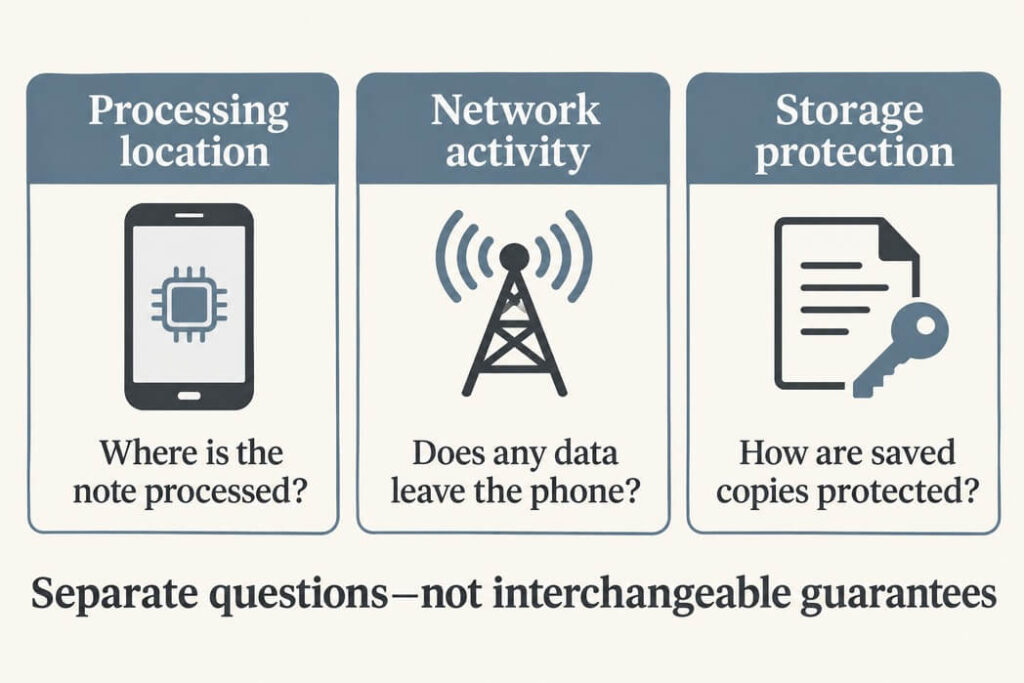
Still, I separate processing location from broader data handling.
Local Versus Online Summarization
A conventional cloud service receives text submitted for inference. A local model performs that calculation on the phone.
Google’s on-device AI guidance describes offline processing without sending input to a remote model.
| Privacy question | Local processing | Cloud processing |
|---|---|---|
| Where does inference happen? | Phone hardware. | Remote infrastructure. |
| Does inference require note transmission? | No, for a fully local path. | Yes, for conventional remote processing. |
| Does that establish private storage? | No. Saved-data protection needs separate verification. | No. Retention and storage policies need review. |
| Can other network activity occur? | Yes, through downloads, diagnostics, or optional connected features. | Yes, alongside the inference request. |
“Not used for training” does not answer every retention question. “Runs locally” does not establish zero telemetry.
Is a Fully Local Mobile Workflow Viable?
Yes, provided the phone supports the selected model and its output is adequate for the task.
For short thoughts and article outlines, I can test that suitability directly. Longer recordings and complex documents need separate evaluation.
A phone sending requests to a home computer is a different setup. It may avoid a third-party inference provider, but processing is not happening on the handset.
Does the App Encrypt Saved Notes?
I could not verify a separate encrypted Android chat database from the public documentation reviewed here.
Atomic Chat’s privacy policy states that conversations remain on-device. That is not equivalent to documenting application-level encryption.
I would not describe saved chats as an encrypted vault without evidence explaining how text and encryption keys are protected.
Android Encryption and App Encryption Differ
Android’s file-based encryption documentation describes platform storage protection. Devices launching on Android 10 or later must use file-based encryption.
Default credential-encrypted storage is available after the first device unlock following a restart, subject to system access controls.
A separately encrypted notebook can add another protection boundary through its own key management. A PIN screen alone does not establish that boundary.
Missing App-Level Encryption Does Not Mean Public Notes
Absence of a separate encryption layer would not automatically upload notes or allow every installed app to read them.
The narrower concern is whether additional cryptographic protection exists beyond Android’s platform safeguards.
Someone able to open an accessible chat history can read its contents through the interface. Exported text and backups create further copies requiring review.
For confidential material, I would want documented active-storage encryption and clear backup behavior before treating a chat application as a private journal.
Telemetry Claims Need Clarification
The reviewed privacy policy contained conflicting passages.
An analytics paragraph described usage events, performance metrics, error diagnostics, and basic device information processed through PostHog. Another passage denied application telemetry, usage analytics, and error-log collection.
That inconsistency does not prove note uploads. It prevents an unqualified zero-data-collection claim.
I would review current disclosures, selected processing settings, permissions, and network behavior separately from my disconnected test.
Can I Record and Summarize Voice Notes Offline?
Speaking a rough thought could suit my preference for minimal software, especially after pausing a walk or run.
My experience saving an article idea does not establish a verified recording-and-transcription pipeline.
The reviewed Android documentation did not clearly confirm built-in recording, existing-audio import, and local transcription as a complete workflow.
I cannot responsibly claim those features are absent either. Their availability needs checking against the installed release.
A Microphone Button Is Not Enough Evidence
Keyboard dictation may use a separate service. Audio processing could follow a different path from text generation.
My preferred workflow would be:
Record locally → transcribe locally → summarize locally → protect saved contentIf an installed version lacks that workflow, straightforward offline recording and transcription would be a useful addition. I would prefer record, review, and summarize controls over unrelated features.
Before describing a personal recording experience, I would test fresh audio disconnected, inspect the transcript, and request a summary. Importing an existing file requires another test.
Checking Summary Accuracy
Privacy and accuracy solve different problems. A local model can still omit uncertainty, merge separate ideas, or invent a deadline.
I keep original notes until comparing generated output against them.
Give the Model a Narrow Job
For article concepts, I use instructions such as:
Turn this note into an article brief. Return a working title, central question, supporting points, and unanswered questions. Preserve names, numbers, and uncertainty. Add no facts. Flag unclear wording instead of guessing.
For personal tasks:
Extract explicit tasks, dates, and names. Do not invent deadlines or assign responsibility unless stated.
These prompts define the requested structure. They do not guarantee compliance.
Review Meaning, Not Just Readability
Check names, quantities, dates, decisions, and open questions. A polished paragraph can still misstate a rough note.
For audio, inspect transcription first. An incorrectly recognized name may survive every later stage.
Long notes can be processed as shorter sections, but splitting can separate related facts. Preserve source material and compare any combined summary against it.
My Checklist Before Adding Sensitive Thoughts
A disconnected test is a useful start, not a complete audit.
- Confirm the selected model runs locally without automatic cloud fallback.
- Test fresh input after restarting disconnected.
- Check voice processing separately from text generation.
- Review saved-data encryption and locking behavior.
- Check exports, backups, and retained conversation history.
- Observe network behavior after reconnecting.
- Compare summaries against original notes.
Disconnected processing is just part of everyday reliability. My smartphone app testing checklist covers other checks, including app switching, interrupted connections, permissions, and recovery after returning from the background.
Encrypted network traffic can conceal message contents from ordinary monitoring. A connection alone does not prove note transmission, and a short quiet session does not prove permanent network silence.
Any reported result should identify the application version, Android version, selected model, and test conditions.
Keep Processing, Storage, and Accuracy Separate
An offline note summarization app can organize thoughts on Android without requiring cloud inference. Its usefulness depends on compatible hardware, suitable models, and careful review.
My own interest began with an article idea during a run. Assessing privacy required a separate look at processing, storage, and optional network activity.
Start using a short, non-sensitive passage. Generate a disconnected summary and compare every detail. Before adding personal reflections, check where copies remain and how they are protected.
A minimal workflow should reduce unnecessary steps without hiding important boundaries.